> ## Documentation Index
> Fetch the complete documentation index at: https://docs.suga.app/llms.txt
> Use this file to discover all available pages before exploring further.
# Service Configuration
> Templates, environment variables, resources, scaling, and secrets
This reference covers all service configuration options: templates, environment variables, resource allocation, scaling, and secrets management.
## Templates
Templates are pre-configured services with production-ready defaults.
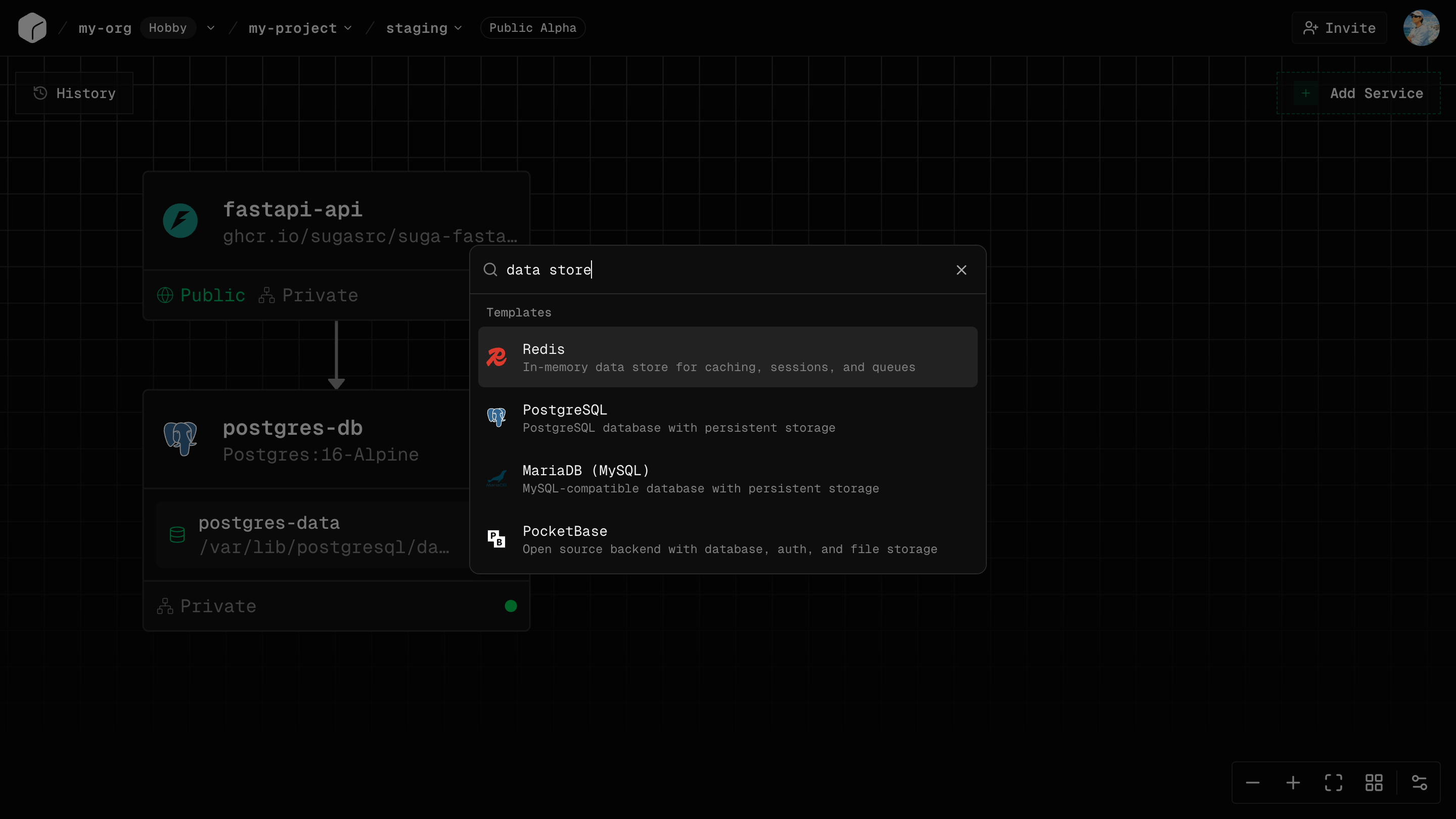 ### What Templates Provide
* **Docker images** with tested versions
* **Environment variables** with validation and auto-generation
* **Networking and volumes** configured automatically
* **Multi-service stacks** with connections pre-wired
### Using a Template
1. Open the templates panel
2. Select a template to add to your canvas
3. Fill required fields (passwords can be auto-generated)
4. Customize as needed (resources, env vars, networking)
5. Deploy
All template settings can be modified after adding.
### Multi-Service Templates
Some templates deploy complete stacks (app + database + cache) with all connections configured automatically, including service-to-service networking and shared environment variables.
***
## Environment Variables
Environment variables configure your services at runtime.
### Adding Variables
1. Select service → Config tab → Environment Variables
2. Click "Add Variable"
3. Enter key (e.g., `DATABASE_URL`), value, and check "Sensitive" for secrets
4. Deploy to apply
### Common Variables
```bash theme={null}
# Database connections (use service names as hostnames)
DATABASE_URL=postgresql://user:password@postgres:5432/database
# API keys (mark as Sensitive)
STRIPE_SECRET_KEY=sk_live_...
API_KEY=your-api-key
# Application config
NODE_ENV=production
PORT=3000
```
### Accessing in Code
**Node.js:** `process.env.DATABASE_URL`
**Python:** `os.environ.get('DATABASE_URL')`
**Go:** `os.Getenv("DATABASE_URL")`
**Deno:** `Deno.env.get("DATABASE_URL")`
### Environment-Specific Values
Each environment has independent variables. Production and staging can have different database URLs, API keys, and feature flags without leaking between environments.
***
## Resources
Resources define CPU and memory allocation per service.
### CPU
| Cores | Best For |
| -------- | ----------------------------- |
| **0.25** | Small APIs, dev environments |
| **0.5** | Lightweight services, workers |
| **1** | Standard web applications |
| **2** | Medium traffic applications |
| **4** | High traffic, CPU-intensive |
**Throttling:** If your service exceeds CPU allocation, it gets throttled (slowed down) but doesn't crash.
### Memory
| Memory | Best For |
| ----------- | ----------------------- |
| **256 MiB** | Tiny services |
| **512 MiB** | Small applications |
| **1 GiB** | Standard applications |
| **2 GiB** | Medium applications |
| **4 GiB** | Large apps, databases |
| **8 GiB** | Very large applications |
**OOM Kills:** If your service exceeds memory, it will be terminated (OOMKilled) and restarted automatically.
OOMKilled services lose in-memory state. Increase memory if you see frequent OOM kills in logs.
### CPU and Memory Ratio
Suga Cloud requires per-service memory to fall within **1 GiB to 6.5 GiB per CPU core**. If you configure resources outside this ratio, the smaller value is rounded up automatically, which can result in higher than expected billing. Always set CPU and memory together.
| CPU | Valid Memory Range |
| ---------- | ------------------- |
| 0.25 cores | 256 MiB – 1.625 GiB |
| 0.5 cores | 512 MiB – 3.25 GiB |
| 1 core | 1 GiB – 6.5 GiB |
| 2 cores | 2 GiB – 13 GiB |
| 4 cores | 4 GiB – 26 GiB |
### Plan Limits
Per-service maximums and organization-wide pool budgets vary by plan. See [Plan Limits](/reference/limits) for full details.
## Scaling
Scale applications by adding resources (vertical) or replicas (horizontal).
### Replicas
Replicas are identical copies of your service running simultaneously:
* **Load Balancing** - Traffic distributed automatically
* **Redundancy** - If one fails, others continue serving
* **Rolling Updates** - New versions deploy gradually
### Setting Replicas
1. Select service → Config tab → Replicas
2. Set number (e.g., 1, 2, 3, 5)
3. Deploy
### Volume Limitation
Services with volumes can only have **1 replica**. Volumes cannot be shared across instances.
Keep databases at 1 replica and scale the stateless application services that connect to them.
### Cost
Replicas multiply resource costs:
* 1 replica with 1 CPU: 1x cost
* 3 replicas with 1 CPU: 3x cost
### Vertical Autoscaling
Enable autoscaling on a service to let Suga Cloud adjust CPU and memory between bounds you set, based on actual usage:
* **Minimum**: the baseline allocation, always reserved
* **Maximum**: the ceiling Suga will scale to under load
When possible, resources are resized in place without restarting your service. If the runtime needs to restart to pick up a new memory limit, the service is restarted with the new allocation.
For autoscaling services, the **maximum** values count toward your organization's resource pool. Suga reserves the burst ceiling rather than the baseline. See [Plan Limits](/reference/limits#organization-resource-pools).
***
## Common Questions
No, each service has its own variables. Set them separately for each service.
No, resource changes require a new deployment.
No, services with volumes must have exactly 1 replica.
Service gets throttled (slowed down) but doesn't crash.
Service may be killed (OOMKilled) and restarted. Increase memory to prevent this.
### What Templates Provide
* **Docker images** with tested versions
* **Environment variables** with validation and auto-generation
* **Networking and volumes** configured automatically
* **Multi-service stacks** with connections pre-wired
### Using a Template
1. Open the templates panel
2. Select a template to add to your canvas
3. Fill required fields (passwords can be auto-generated)
4. Customize as needed (resources, env vars, networking)
5. Deploy
All template settings can be modified after adding.
### Multi-Service Templates
Some templates deploy complete stacks (app + database + cache) with all connections configured automatically, including service-to-service networking and shared environment variables.
***
## Environment Variables
Environment variables configure your services at runtime.
### Adding Variables
1. Select service → Config tab → Environment Variables
2. Click "Add Variable"
3. Enter key (e.g., `DATABASE_URL`), value, and check "Sensitive" for secrets
4. Deploy to apply
### Common Variables
```bash theme={null}
# Database connections (use service names as hostnames)
DATABASE_URL=postgresql://user:password@postgres:5432/database
# API keys (mark as Sensitive)
STRIPE_SECRET_KEY=sk_live_...
API_KEY=your-api-key
# Application config
NODE_ENV=production
PORT=3000
```
### Accessing in Code
**Node.js:** `process.env.DATABASE_URL`
**Python:** `os.environ.get('DATABASE_URL')`
**Go:** `os.Getenv("DATABASE_URL")`
**Deno:** `Deno.env.get("DATABASE_URL")`
### Environment-Specific Values
Each environment has independent variables. Production and staging can have different database URLs, API keys, and feature flags without leaking between environments.
***
## Resources
Resources define CPU and memory allocation per service.
### CPU
| Cores | Best For |
| -------- | ----------------------------- |
| **0.25** | Small APIs, dev environments |
| **0.5** | Lightweight services, workers |
| **1** | Standard web applications |
| **2** | Medium traffic applications |
| **4** | High traffic, CPU-intensive |
**Throttling:** If your service exceeds CPU allocation, it gets throttled (slowed down) but doesn't crash.
### Memory
| Memory | Best For |
| ----------- | ----------------------- |
| **256 MiB** | Tiny services |
| **512 MiB** | Small applications |
| **1 GiB** | Standard applications |
| **2 GiB** | Medium applications |
| **4 GiB** | Large apps, databases |
| **8 GiB** | Very large applications |
**OOM Kills:** If your service exceeds memory, it will be terminated (OOMKilled) and restarted automatically.
OOMKilled services lose in-memory state. Increase memory if you see frequent OOM kills in logs.
### CPU and Memory Ratio
Suga Cloud requires per-service memory to fall within **1 GiB to 6.5 GiB per CPU core**. If you configure resources outside this ratio, the smaller value is rounded up automatically, which can result in higher than expected billing. Always set CPU and memory together.
| CPU | Valid Memory Range |
| ---------- | ------------------- |
| 0.25 cores | 256 MiB – 1.625 GiB |
| 0.5 cores | 512 MiB – 3.25 GiB |
| 1 core | 1 GiB – 6.5 GiB |
| 2 cores | 2 GiB – 13 GiB |
| 4 cores | 4 GiB – 26 GiB |
### Plan Limits
Per-service maximums and organization-wide pool budgets vary by plan. See [Plan Limits](/reference/limits) for full details.
## Scaling
Scale applications by adding resources (vertical) or replicas (horizontal).
### Replicas
Replicas are identical copies of your service running simultaneously:
* **Load Balancing** - Traffic distributed automatically
* **Redundancy** - If one fails, others continue serving
* **Rolling Updates** - New versions deploy gradually
### Setting Replicas
1. Select service → Config tab → Replicas
2. Set number (e.g., 1, 2, 3, 5)
3. Deploy
### Volume Limitation
Services with volumes can only have **1 replica**. Volumes cannot be shared across instances.
Keep databases at 1 replica and scale the stateless application services that connect to them.
### Cost
Replicas multiply resource costs:
* 1 replica with 1 CPU: 1x cost
* 3 replicas with 1 CPU: 3x cost
### Vertical Autoscaling
Enable autoscaling on a service to let Suga Cloud adjust CPU and memory between bounds you set, based on actual usage:
* **Minimum**: the baseline allocation, always reserved
* **Maximum**: the ceiling Suga will scale to under load
When possible, resources are resized in place without restarting your service. If the runtime needs to restart to pick up a new memory limit, the service is restarted with the new allocation.
For autoscaling services, the **maximum** values count toward your organization's resource pool. Suga reserves the burst ceiling rather than the baseline. See [Plan Limits](/reference/limits#organization-resource-pools).
***
## Common Questions
No, each service has its own variables. Set them separately for each service.
No, resource changes require a new deployment.
No, services with volumes must have exactly 1 replica.
Service gets throttled (slowed down) but doesn't crash.
Service may be killed (OOMKilled) and restarted. Increase memory to prevent this.