

What is a Service?
A service is a running instance of your application code:- Execution Environment - Where your code runs
- Configurable Resources - CPU, memory, and replicas
- Network Accessible - Public (HTTPS/TCP) or private (service discovery)
- Stateless - Use volumes for persistent storage
Containers vs. Functions
Containers
Containers run Docker images from any registry. They provide maximum flexibility for existing applications in any language or framework. A container’s image comes from one of two sources:- Build from GitHub - Connect a repository so Suga builds the image for you. Each push to the watched branch triggers an automatic rebuild and redeploy.
- Pre-built Image - Pull an existing image from any Docker registry. Best when you already build elsewhere (CI, local Docker, another platform) or are running off-the-shelf images like databases, caches, etc.
Build from GitHub
Connect a GitHub repository and Suga builds the image for you. Pushes to the watched branch trigger an automatic rebuild and redeploy.1
Install the GitHub App
In the container’s Image section, choose Build from GitHub and install the Suga GitHub App on your account or organization. Grant access to the repositories you want to build from.
2
Select Repository and Branch
Pick a repository and the branch to watch. Pushes to this branch trigger a new build.
3
Choose a Build Method
- Dockerfile - point Suga at a
Dockerfilein the repo. - Auto-detect - leave the Dockerfile field empty and Suga reads the repo to generate a build. Works for most Node.js, Python, Go, Ruby, Rust, Java, and PHP projects.
4
Apply
Click Apply to build the image and roll out the service. Subsequent pushes to the watched branch trigger an automatic rebuild and redeploy.
The Suga GitHub App is installed once per account or organization. After installation, any container service can build from the repositories you’ve granted access to.
Build Configuration
Dockerfile builds expose four settings:
Branch and build configuration together identify a build, so two services on the same repo can build different stages or contexts without colliding.
Auto-Build on Push
Auto-build is on by default. Each push to the watched branch:- Builds the configured Dockerfile (or the auto-detected project).
- Tags the image with the commit SHA.
- Rolls out the new image to every environment whose service is wired to that branch.
Pre-built Image
Pull an image from any Docker-compatible registry (Docker Hub, GHCR, GCR, ECR, ACR, or self-hosted) by its full reference:nginx:alpine- Official Nginx from Docker Hubpostgres:16-alpine- PostgreSQL 16ghcr.io/username/myapp:v1.0.0- GitHub Container Registry
Automatic Updates from External Registries
After a pre-built image is deployed, Suga polls the registry for a new digest at the same tag and rolls the service forward when one appears. Useful for:- Mutable tags like
:latest,:stable, or:edge. - External CI pipelines that build outside Suga and push to a tag your service tracks.
Creating a Container
1
Open the Add palette
Click Add in the top right of the canvas, or right-click empty space. The palette is searchable and lists Service from GitHub, Service from Container, Template, Function, and Import Compose.
2
Pick a source
Choose Service from GitHub to build from source, Service from Container for a pre-built image from a registry, or Template for a pre-configured service. Then set the display name.
3
Set Port
If your app listens on a port, specify it. Enable HTTPS or TCP proxy for public access.
4
Add Environment Variables
Database URLs, API keys (mark as Sensitive), feature flags.
5
Set Resources
Allocate CPU and memory. New services start at 0.1 CPU and 128 MiB.
6
Apply
Click Apply to provision the container.
Supported Registries
Public (no credentials):- Docker Hub:
nginx,postgres,redis - GitHub Container Registry:
ghcr.io/username/image - Quay.io:
quay.io/organization/image
- Docker Hub, GHCR, GCR, ECR, ACR, self-hosted
Suga runs on Linux AMD64. If building on Apple Silicon, use
--platform linux/amd64.Docker Compose Import
Import existing Docker Compose files:- Open the Add palette and choose Import Compose
- Paste YAML or upload file
- Review parsed services
- Import to canvas
Functions
Functions run Deno code. Write TypeScript/JavaScript directly in the dashboard instead of building Docker images.How Functions Work
Functions start an HTTP server on a configured port. Configuration (env vars, resources, networking, replicas) is identical to containers, but you write code in the Code tab instead of specifying an image. There’s no container build for functions. Your TypeScript ships with the deployment and runs on a managed Deno runtime, so changes go live in seconds. That makes functions a good fit for small APIs, webhooks, and quick prototyping.Default Template
New functions use this Hono-based template:Code Editor
Select function → Code tab → write code → Apply. The editor supports TypeScript syntax highlighting and basic completion.Imports
Environment Variables
Common Configuration
Both containers and functions share these configuration options: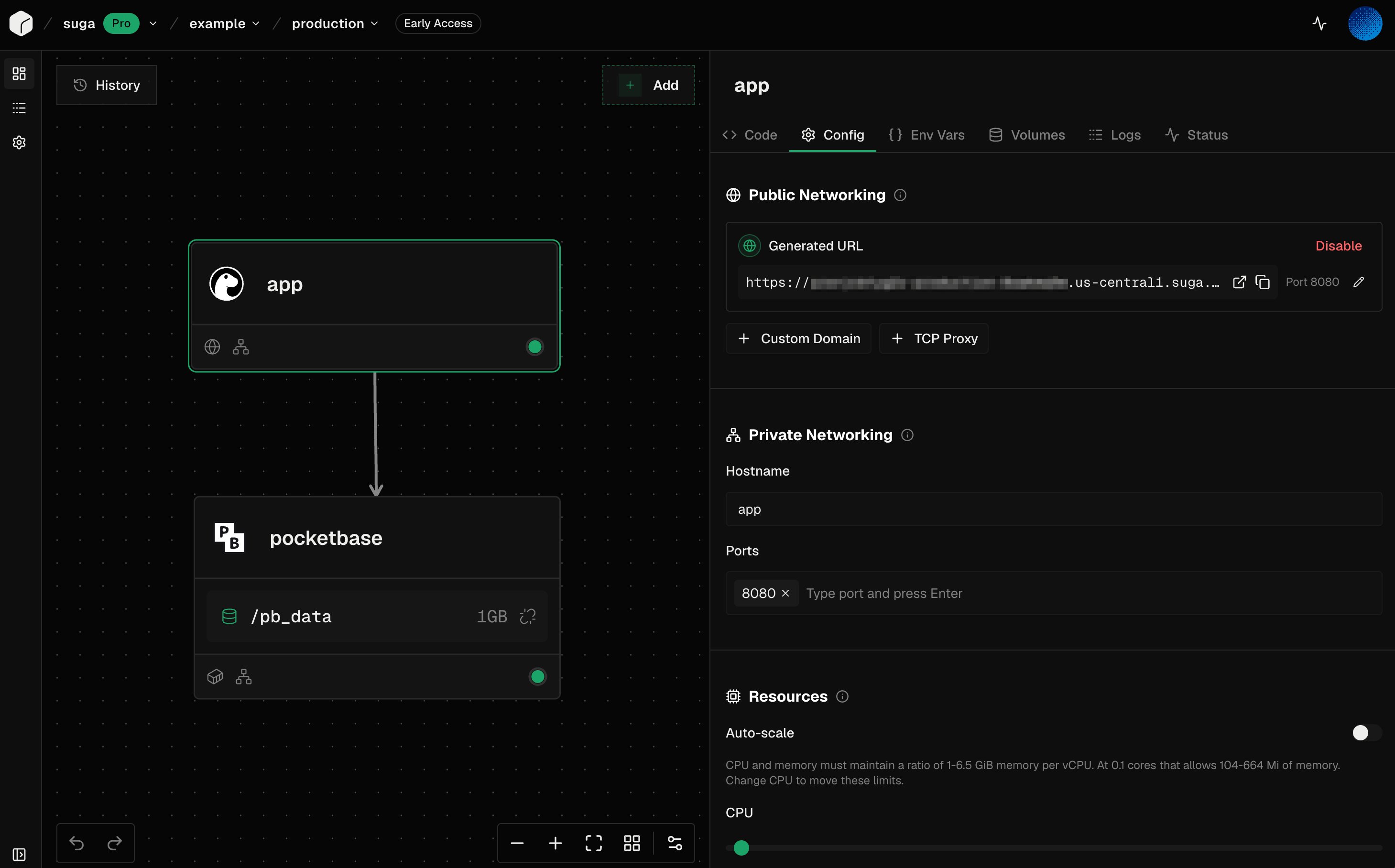
Resources
Each service is configured with CPU, memory, and replicas. Your allocation is a guaranteed floor, not a cap: services can burst above it for free, and billing is based on the allocation. See Billing and Resource Allocation for how that works and how to size a service, and Plan Limits for tier maximums, resource pools, volume limits, and the CPU/memory ratio rules.Networking
Private - Services in the same environment communicate via service names:Environment Variables
Key-value configuration for your services:- Database connection strings
- API keys and secrets (mark as Sensitive)
- Feature flags and settings
Volumes
Persistent storage that survives restarts and redeployments:- Mount paths inside the container
- Size limits vary by plan
- Single-mount only (one service per volume)
Service Templates
Templates provide pre-configured services for common use cases:- PostgreSQL - Database with volume and default credentials
- Redis - Cache with persistence options
- MariaDB - MySQL-compatible database