

package.json and runs your start script, so no Dockerfile is needed.
This guide explains how to deploy an Express API with Postgres in two ways:
Your repo needs a package.json with a start script (typically node index.js or node dist/server.js), express in dependencies, and a Postgres client (pg, or an ORM like prisma, drizzle-orm, or knex).
The guide assumes your app reads process.env.DATABASE_URL for the Postgres connection and binds to process.env.PORT on 0.0.0.0.
Deploy using the Canvas
Create a project from your repo
package.json and uses your start script. See Import from a GitHub repository for the full set of import options.Click Create project. Suga opens the canvas with the app service already connected to your repo.Add Postgres from a template
POSTGRES_USER and POSTGRES_DB (both default to postgres) and pre-fills a generated POSTGRES_PASSWORD./var/lib/postgresql/data.Expose the app on HTTPS
3000. Then, in the Public Network section, click Add Endpoint → HTTPS Domain and choose port 3000.Wire PORT and DATABASE_URL
PORT env var set to 3000. Nothing sets it for you, so without it your app falls back to whatever default it sets in code.Then add a DATABASE_URL env var. Set the value to a connection string with an embedded reference to Postgres’s password:{{...}} picker inserts the reference alongside literal text, so the app reads the password from postgres at deploy time without duplicating it. Swap the user and database name if you changed them from the defaults.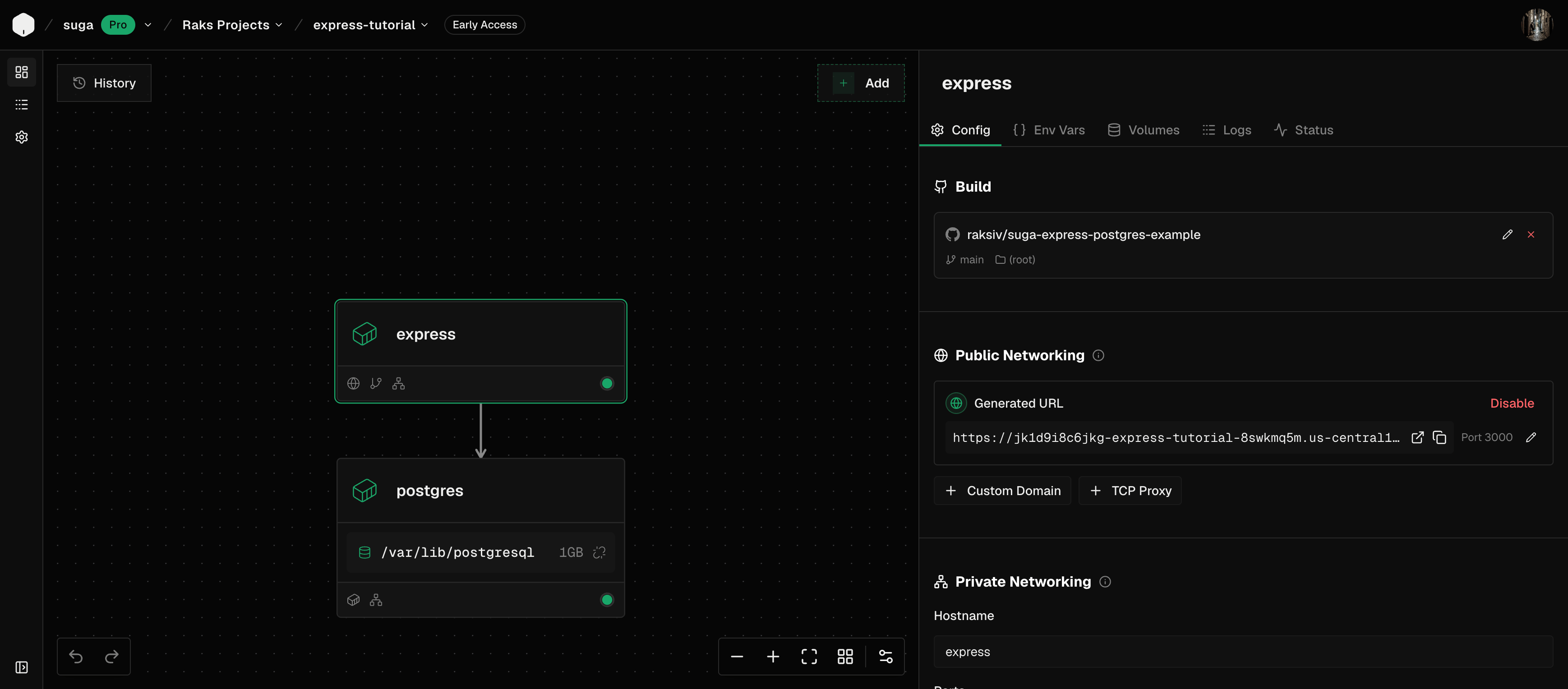
Apply to deploy
npm install, starts your app with npm start, and rolls out both containers. The Express API is served at the public URL and reaches Postgres privately at postgres:5432. Open the public URL and you’ll get your app’s root route.Deploy using an Agent
To deploy with a coding agent such as Claude Code, Codex, or OpenCode, follow these steps:Connect the Suga MCP
Ask your agent to deploy
Set the sensitive values
POSTGRES_PASSWORD on the postgres container: click the value input and paste a value generated with openssl rand -hex 32. If your app has other secrets (JWT signing keys, session secrets, API keys), add them to the app container as Sensitive env vars.Apply to deploy
npm install, starts your app with npm start, and rolls out both containers. The Express API is served at the public URL and reaches Postgres privately at postgres:5432. Open the public URL and you’ll get your app’s root route.FAQ
Do I need a Dockerfile to deploy Express on Suga?
Do I need a Dockerfile to deploy Express on Suga?
package.json and runs npm install followed by your start script. If you already have a Dockerfile, you can tell the agent to use it instead; otherwise auto-detect handles the common case.Which Node versions does Suga support?
Which Node versions does Suga support?
engines.node in package.json, or a .nvmrc file if present, and falls back to a recent LTS release.What if my start script isn't npm start?
What if my start script isn't npm start?
start script in package.json to whatever you actually run (node dist/server.js, tsx src/index.ts, and so on). Alternatively, pass RAILPACK_START_CMD as a build arg on the app container with your exact command, for example node --enable-source-maps dist/server.js.What if I use yarn, pnpm, or bun instead of npm?
What if I use yarn, pnpm, or bun instead of npm?
yarn.lock, pnpm-lock.yaml, bun.lock or bun.lockb) and runs the matching install and start commands. Commit the lockfile to your repo and the auto-detect handles the rest.Can I use TypeScript without a build step?
Can I use TypeScript without a build step?
start script to tsx src/index.ts (or ts-node) so the runtime handles compilation. For production performance, prefer a real build step with tsc and run the compiled output. Suga runs npm run build automatically if you define a build script in package.json.ESM (type: module) or CommonJS — does it matter?
ESM (type: module) or CommonJS — does it matter?
start script says; Node’s module resolution is decided by package.json "type" and file extensions, both of which the runtime handles at boot. No Suga-side configuration needed.What if my app reads discrete PG* env vars instead of DATABASE_URL?
What if my app reads discrete PG* env vars instead of DATABASE_URL?
DATABASE_URL on the app container and set the individual variables the pg client reads directly: PGHOST=postgres, PGPORT=5432, PGUSER=<postgres-user>, PGDATABASE=<postgres-db>, and PGPASSWORD referencing the postgres container’s POSTGRES_PASSWORD. The cross-container reference works for any variable name.How do I run Prisma migrations before the app starts?
How do I run Prisma migrations before the app starts?
RAILPACK_START_CMD=npx prisma migrate deploy && node dist/server.js as a build arg. The migration runs each time a new container boots and no-ops if there’s nothing to apply.What about Drizzle or Knex migrations?
What about Drizzle or Knex migrations?
RAILPACK_START_CMD=npx drizzle-kit migrate && node dist/server.js. For Knex: RAILPACK_START_CMD=npx knex migrate:latest && node dist/server.js. Either wraps the migration into the start command so it runs at boot.Can I skip auto-migrations at boot?
Can I skip auto-migrations at boot?
RAILPACK_START_CMD and run migrations manually — from the container’s shell in the dashboard, or from your CI pipeline before you Apply. Running migrations at boot is convenient, but teams with strict migration workflows often prefer to trigger them explicitly.Can I add Redis for caching or sessions?
Can I add Redis for caching or sessions?
REDIS_URL on the app container to redis://:{{redis.variables.REDIS_PASSWORD}}@redis:6379. The app reaches it over the private network without going through the public endpoint.Can I use a database other than Postgres?
Can I use a database other than Postgres?
postgres:18-alpine container for a MySQL, MariaDB, or MongoDB image. Update DATABASE_URL (or the equivalent env vars) and the client library in your package.json to match.Can I use a custom domain?
Can I use a custom domain?
What does deploying Express plus Postgres cost on Suga?
What does deploying Express plus Postgres cost on Suga?